Skip to content
Free for every CoinMC account

Trading Journal App for Crypto Traders

Connect Binance or Bybit with a read-only key, or upload a CSV, and see exactly what is working in your trading: win rate, profit factor, drawdown, and which coins, days and hours make or lose you money.
  • Read-only API keys
  • AES-256 encrypted
  • CSV for any exchange
  • Export or delete anytime
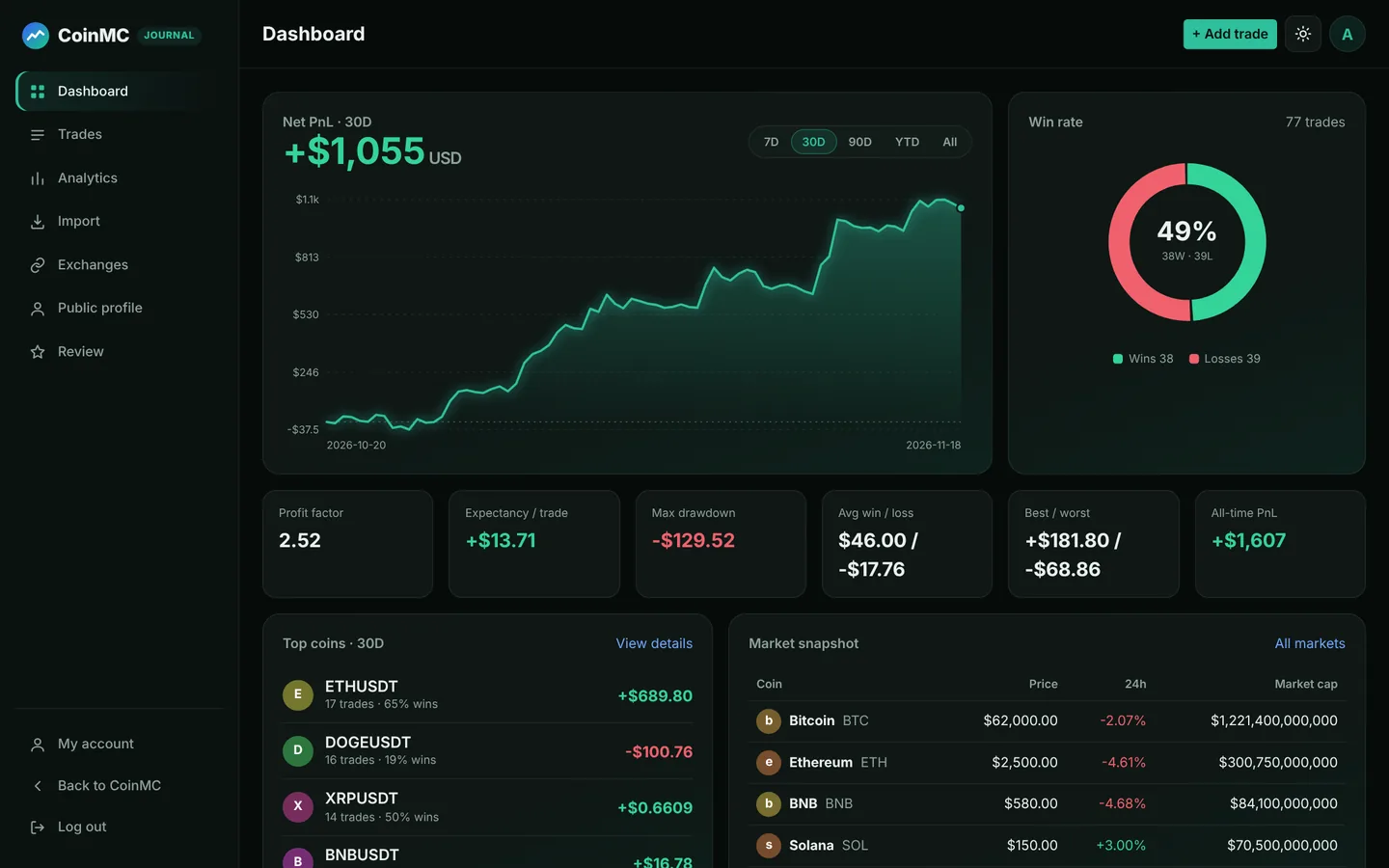
Trading journal dashboard showing equity curve, win rate donut, top coins and market snapshot
Dashboard with sample data
Trading journal dashboard with equity curve and win rate
Dashboard with sample data
$0Free for every member
2Exchanges with automatic import
12+Performance metrics
AnyExchange via CSV upload
Features

Everything a crypto trading journal should do

Record every trade, understand your results, and fix what is costing you money, without maintaining a spreadsheet.

Automatic trade journaling

Connect Binance or Bybit once and closed trades arrive on their own, about every 30 minutes. No spreadsheets, no copy and paste.

Analytics that answer questions

Net PnL, win rate, profit factor, expectancy, payoff ratio, maximum drawdown, streaks and average holding time, calculated for you.

Find your edge by coin, day and hour

See which symbols pay you, which weekdays to skip and which hours you trade best, based on your own history.

Notes and tags on every trade

Record why you entered and whether you followed your plan. Tag setups like breakout or pullback and filter your stats by tag.

A profile you can share

Optional public page with win rate, profit factor and equity curve. Dollar amounts stay private unless you choose to show them.

Private by design

Read-only keys, AES-256-GCM encryption, one-click disconnect that deletes the key and its trades, and CSV export of everything you own.

Inside the app

A dashboard built for reviewing your trades

Screenshots use sample data. Your own numbers fill in as soon as you import trades.
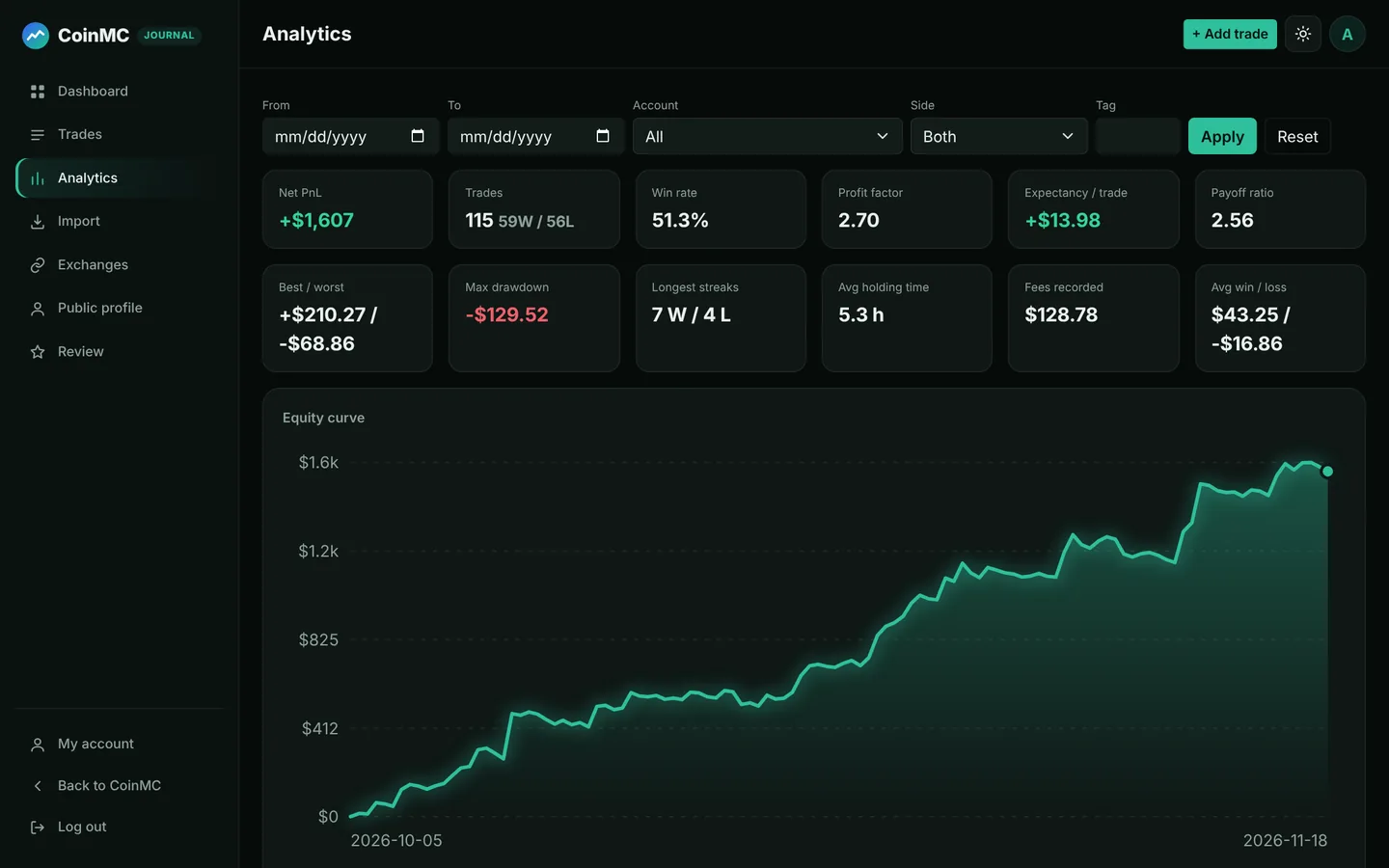
Analytics screen with profit factor, expectancy, drawdown and PnL by weekday and hour
Analytics: profit factor, expectancy, drawdown, results by weekday, hour and coin.
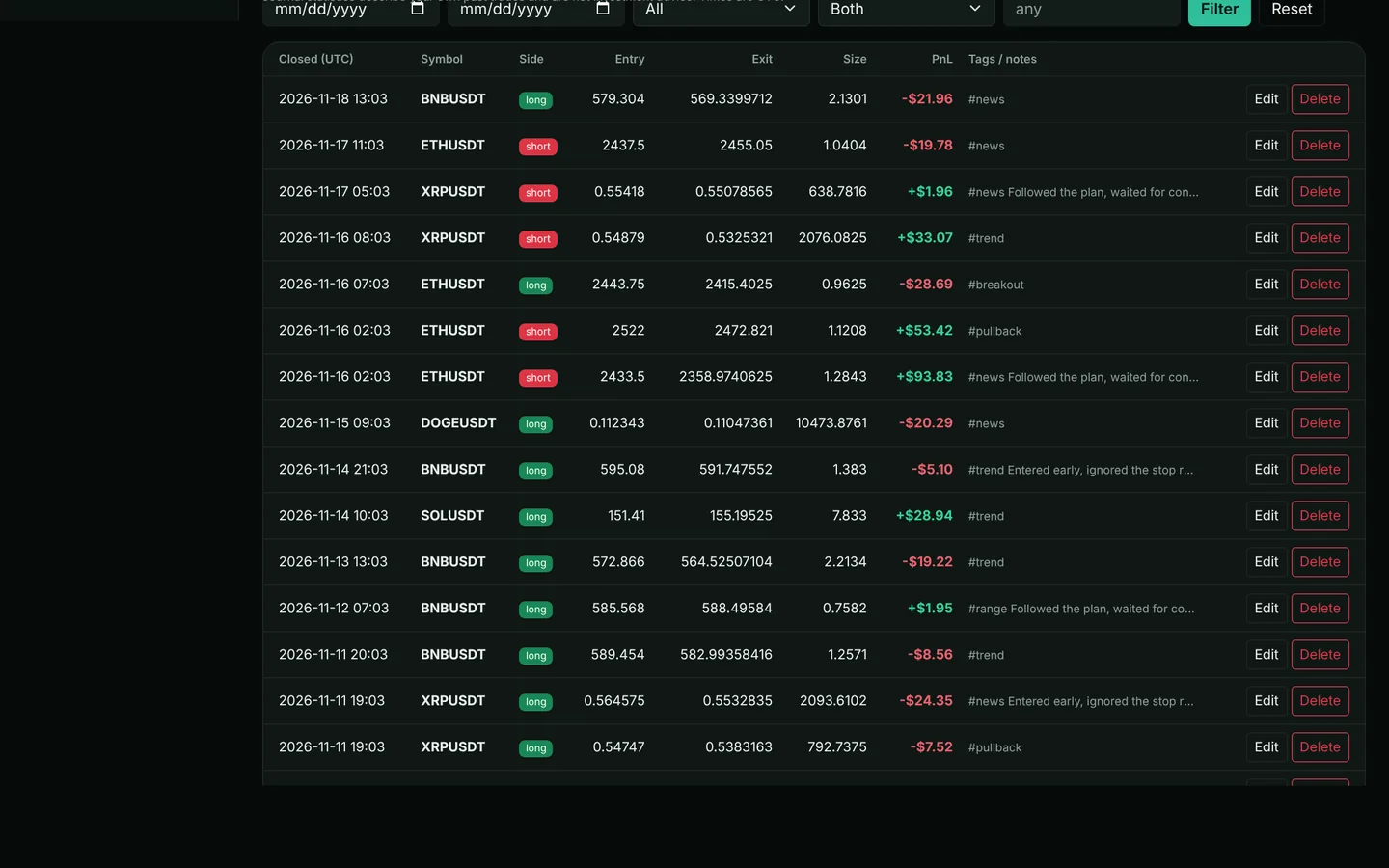
Trade list with symbol, side, entry, exit, size, PnL, tags and notes
Trades: every trade with notes and tags, filters and one-click CSV export.
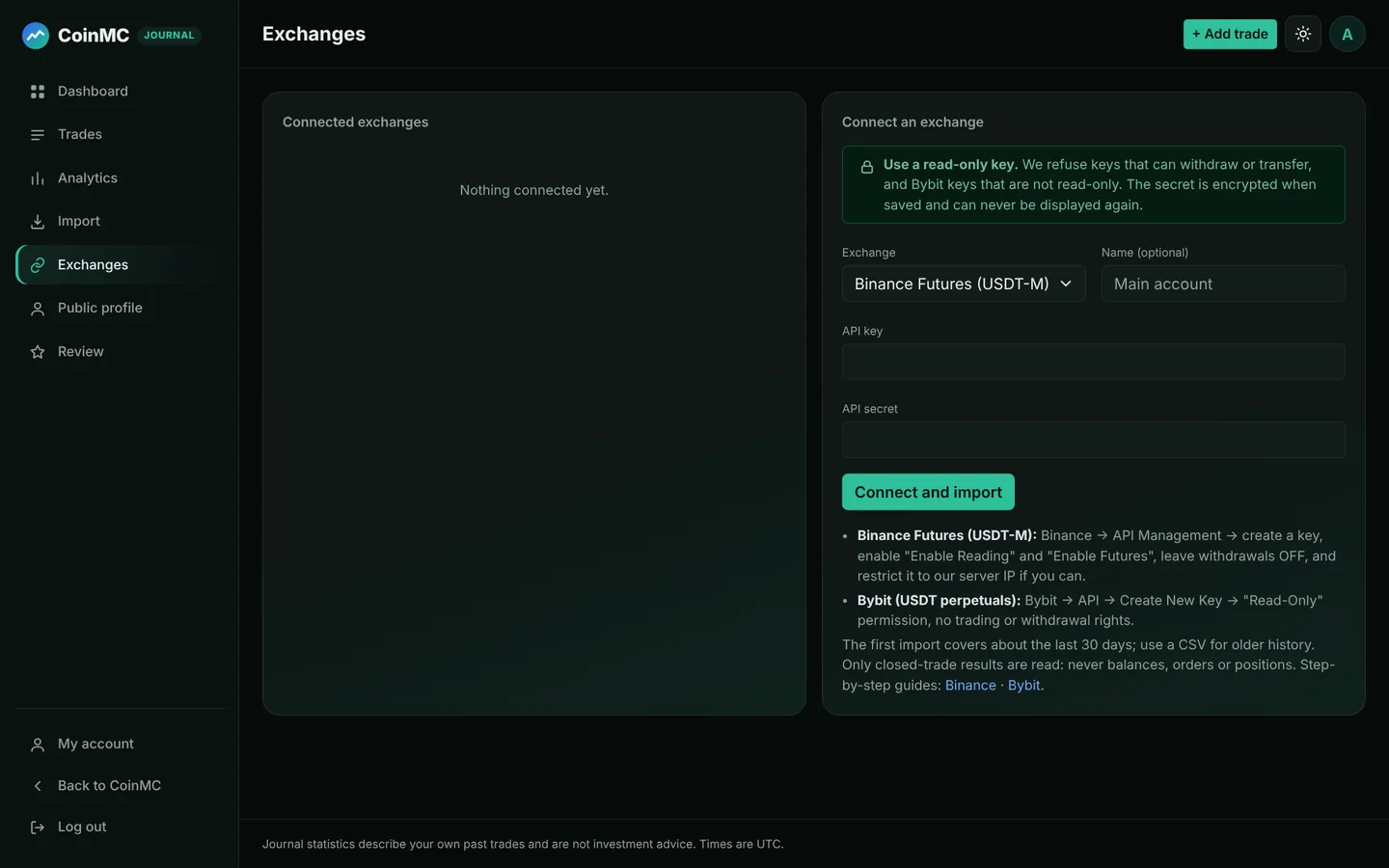
Exchange connection screen for Binance and Bybit read-only API keys
Exchanges: read-only key import for Binance and Bybit with sync status.
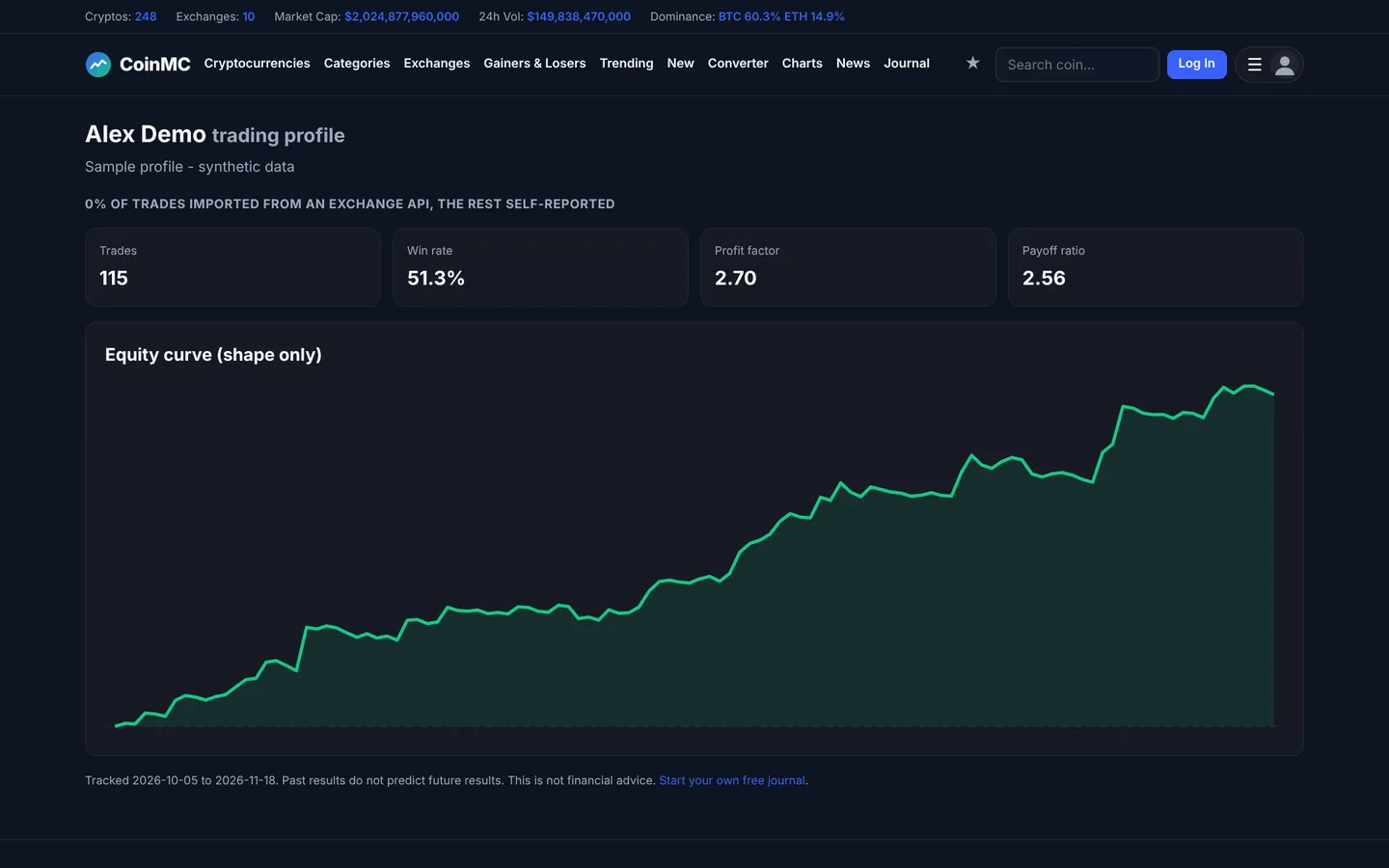
Public trading profile page with win rate, profit factor and equity curve
Public profile: share win rate and equity curve, with dollar amounts hidden by default.
How it works

Up and running in minutes

1

Create a free account

It takes a minute and also gives you a synced watchlist for the coins you trade.

2

Connect an exchange or upload a CSV

API keys are checked on connection and refused if they can withdraw or transfer funds.

3

Review your numbers

The first import pulls about 30 days; older trades can be added from a CSV export. New trades sync automatically.

Start free

Learn

Why keep a trading journal?

Memory is selective. Most traders remember their best trades and explain away the rest, so they repeat the same mistakes without noticing. A trading journal replaces memory with data: every trade, with its result, its reason and its context.

Once you have a few dozen trades, patterns appear. Maybe your breakouts make money and your counter-trend trades lose it. Maybe you trade worst late at night, or after two losses in a row. A trading journal app does the bookkeeping, so your time goes into reviewing, which is where the improvement happens.

The journal does not tell you what to trade. It shows you, honestly, what you did and what it produced.

Metrics

The numbers that matter

Winning trades ÷ total trades. Useful, but never on its own: a 40% win rate can be profitable and a 70% win rate can lose money.

Gross profit ÷ gross loss. Above 1.0 you made more than you lost; many traders look for 1.3 or higher over a meaningful sample.

Average result per trade, including losers. It tells you what each trade is worth to you in dollars over time.

Average win ÷ average loss. A high payoff ratio lets a low win rate work; a low one needs a very high win rate.

The largest peak-to-trough fall in cumulative PnL. It shows how much pain your strategy puts you through.
Compare

Journal app vs a spreadsheet

SpreadsheetCoinMC Trading Journal App
Getting trades inCopy and paste every tradeAutomatic for Binance and Bybit; CSV for the rest
StatisticsBuild and maintain your own formulasWin rate, profit factor, expectancy, drawdown and more, always up to date
Patterns by coin, day and hourPivot tables you set up yourselfBuilt-in charts and tables
CostFreeFree for every registered member
Your dataStays in your fileExport as CSV any time; delete everything with one click
Reviews

What traders say

Be the first to review the journal.

We only show reviews written by members who have used the journal, after moderation. We do not publish made-up testimonials.

Create a free account
FAQ

Trading journal app questions

A trading journal app records every trade you take (coin, direction, entry, exit, size, fees and result) and turns that history into statistics such as win rate, profit factor and drawdown. Reviewing those numbers shows what is working in your strategy and where you lose money, which is hard to see from memory or a bare exchange history.

Yes. Every registered CoinMC account can use the journal for free, including automatic import, analytics and the optional public profile.

Binance USDT-M futures and Bybit USDT perpetuals via read-only API keys. For any other exchange or broker, upload a CSV export or enter trades by hand.

The journal only reads closed-trade history. Bybit keys must be read-only, and Binance keys with withdrawals or transfers enabled are refused. Keys are stored with AES-256-GCM encryption, are never displayed again, and are deleted when you disconnect the exchange. You should also restrict the key to our server IP on the exchange.

Record every trade, including losers. Add a short note about why you entered and whether you followed your plan, tag setups (for example breakout or pullback), and review your statistics weekly. The journal does the recording; the discipline of reviewing is yours.

Win rate alone is misleading. Read it together with the average win versus average loss (payoff ratio), profit factor (gross profit divided by gross loss), expectancy (average result per trade) and maximum drawdown. A 40% win rate can be profitable with a large payoff ratio, and a 70% win rate can lose money with a small one.

Yes. The first exchange sync covers about the last 30 days, and older history can be uploaded as a CSV file. Columns such as symbol, side, entry, exit, size, PnL and times are detected automatically. A free CSV template is available.

The automatic sync is for futures and perpetuals on Binance and Bybit. Spot trades or other exchanges can be added by CSV or manually, as long as each row has a symbol, a close time, and either a PnL or entry, exit and size.

An optional page that shows your win rate, profit factor and equity curve. Dollar amounts stay hidden unless you choose to show them, and the page states how much of your history came directly from an exchange API versus self-reported.

Yes. Disconnecting an exchange deletes its key and imported trades, you can export everything as CSV at any time, and deleting your account removes all journal data.

No. The journal measures what you did; it does not recommend trades. Trading leveraged crypto products carries a high risk of loss, and past results do not predict future results.

Start your trading journal today

Free for every CoinMC account. Import your trades and see your numbers in minutes.

Start free

The journal reports your own results and is not investment advice. Trading leveraged crypto products carries a high risk of loss.